
Table of Contents
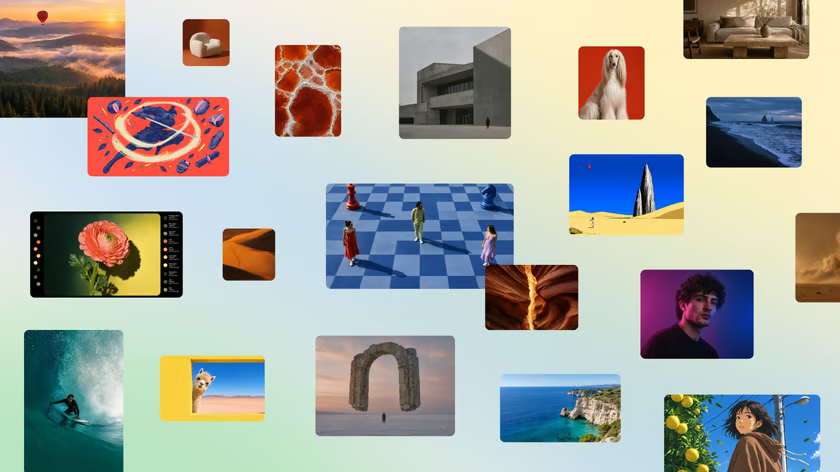
Canva launched Canva Craft today. The tool is an in-house image model that outputs graphics up to 2K. It works across more than 30 aspect ratios. Craft uses a two-stage layout engine. It plans page designs before it draws pixels. The tool is available now to all users in Canva Dream Lab.
The launch marks a big shift for Canva. In August, the team paused its AI rollout over steep cloud costs. Running free users on outside tools like OpenAI cost too much. That delay cut $10 billion from Canva’s private value. Now, Canva owns its own model stack. The company controls its speed, costs, and safety for 200 million monthly active users.
Technical Factsheet: Canva Craft
| Metric / Parameter | Specification |
|---|---|
| Model Name | Canva Craft |
| Developer | Canva Research |
| Output Resolution | Up to 2K (2048×2048 max raster canvas) |
| Supported Aspect Ratios | 30+ formats (1:1, 16:9, 9:16, 4:5, custom print) |
| Core Architecture | Two-stage pipeline: Layout planning and raster synthesis |
| Training Data | Millions of human-made templates, posters, and menus |
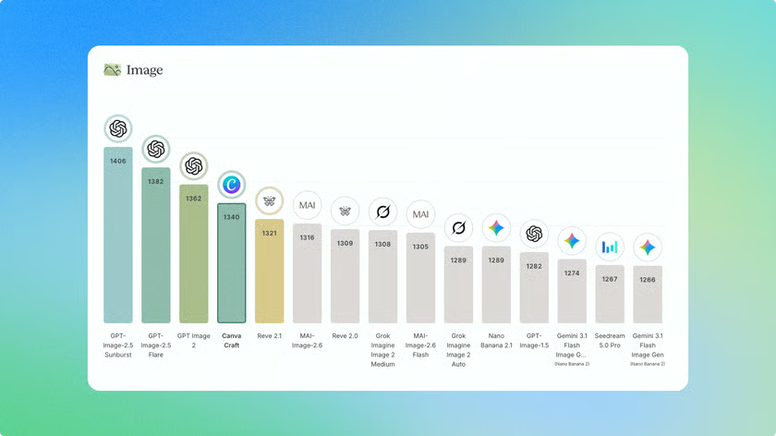
| Global Leaderboard Rank | #4 overall on Design Arena crowdsourced benchmark |
| Top Subcategory Ranks | #1 for People, #1 for Nature, #2 for Abstracts |
| Competitors Outranked | Google Nano Banana, Microsoft MAI-Image, xAI Grok Imagine |
| Agent Protocols | Model Context Protocol (MCP) for external AI agents |
| Planned Variants | Craft-fast, Craft-ultrafast (distilled low-latency tiers) |
| Interface Access | Available globally via Canva Dream Lab (left menu) |
Benchmark Results: How Craft Ranks on Design Arena
Canva tested Craft on Design Arena, a crowdsourced benchmark for AI design models. In blind user testing, Craft ranks fourth globally. Only three models score higher, all from OpenAI: GPT-Image-2.5 Sunburst, GPT-Image-2.5 Flare, and GPT-Image-2.
Craft beat major models from Big Tech rivals. It finished ahead of Microsoft MAI-Image, Google Nano Banana, xAI Grok Imagine, and ByteDance.
Across specific visual tasks, Craft showed clear strengths:
- People and Portraits: Ranked #1, showing clean hands, faces, and skin tones.
- Nature and Landscapes: Ranked #1, rendering natural light and plant textures.
- Abstract Art: Ranked #2, matching top digital art tools.
- Product Mockups: Ranked #4, placing items cleanly on neutral backdrops.
- Marketing Collateral: Ranked #5, aligning banners and flyers to design grids.
- Cartoons and Stylized Art: Ranked #14 out of 87, showing room to grow on line art.
Under the Hood: Two-Stage Planning and Template Training
Most diffusion models generate pixels straight from prompt words. That direct leap often warps text and mixes up visual items.
Canva Craft avoids this problem with a two-stage architecture:
- The Layout Planning Stage: When a user inputs a prompt, Craft first maps a layout plan. It sets bounding boxes, sets visual ranks, and locks exact spots for text and key items.
- The Raster Synthesis Stage: The model then draws high-res pixels inside those planned bounds. Text stays crisp and easy to read. Foreground objects do not blur into back layers.
┌────────────────────────────────────────────────────────┐
│               CANVA CRAFT GENERATION PIPELINE          │
├────────────────────────────────────────────────────────┤
│ [User Prompt or Agent Directives]                      │
│            │                                           │
│            ▼                                           │
│ [Stage 1: Spatial & Compositional Layout Planner]      │
│      ├── Defines Bounding Boxes & Layer Hierarchies    │
│      ├── Sets Text Coordinates & Safe Margins          │
│      └── Fixes Focal Object Placements                 │
│            │                                           │
│            ▼                                           │
│ [Stage 2: High-Resolution Raster Synthesis Engine]     │
│      ├── Generates 2K Pixels within Planned Boundaries │
│      ├── Renders Legible Typography & Graphic Elements │
│      └── Applies Content Moderation & Guardrails       │
│            │                                           │
│            ▼                                           │
│ [Editable Output: Layers Exported to Canva Dream Lab]  │
└────────────────────────────────────────────────────────┘
Canva also changed how it trained the model. Standard image tools train on raw web photos. Canva Research trained Craft on millions of human-made templates from its own catalog. The dataset included social posts, slide decks, infographics, and menus.
Because of this, the model understands graphic balance. It respects whitespace, margins, and font pairings. The system links directly to Canva’s Magic Layers engine. Users can edit single parts of an image without changing the rest.
The Cost Equation: Why Canva Built Its Own Model
Building base models takes heavy funding and deep talent. Canva Research tripled its team over the past year to ship Craft.
The shift came down to basic unit costs:
- Third-Party API Costs: Serving millions of free users through paid APIs hurts margins fast. In August, Canva paused its AI launch because vendor bills grew too high.
- Valuation Pressure: The delay rattled the market, contributing to a $10 billion drop in private valuation.
- Sovereign Infrastructure: By running its own weights on dedicated GPUs, Canva fixes its compute budget. It can offer fast image tools to free and paid users without paying per-call fees to outside labs.
“Building and owning these models gives Canva control over cost, quality, and speed. It lets us deploy AI to the hundreds of millions of people who use Canva every month.”
Developer Integration: Model Context Protocol (MCP)
Canva plans to open Craft to outside developers and AI tools through the Model Context Protocol (MCP). This lets coding tools and autonomous agents call Craft directly to build marketing assets.
{
  "name": "canva_craft_generate",
  "description": "Generate a 2K marketing visual or social asset with Canva Craft",
  "parameters": {
    "type": "object",
    "properties": {
      "prompt": {
        "type": "string",
        "description": "Detailed description of the visual scene and text elements"
      },
      "aspect_ratio": {
        "type": "string",
        "enum": ["1:1", "16:9", "9:16", "4:5"],
        "default": "1:1"
      },
      "include_layers": {
        "type": "boolean",
        "description": "Return editable visual layers for Canva editor"
      }
    },
    "required": ["prompt"]
  }
}
Canva also plans two smaller tiers: Craft-fast and Craft-ultrafast. These distilled models will focus on instant speed for live canvas editing.
How to Test Canva Craft Today
Canva Craft is live for all free and Pro users globally. To test it:
- Open the Canva web app.
- Click the three-dot Apps icon on the left sidebar.
- Select Dream Lab.
- Enter your prompt, pick an aspect ratio, and click generate.
Formatting system prompts, MCP tool schemas, or configuration files? Validate and structure your payloads with TeckScaler’s free client-side JSON to YAML Converter.
🚀 Building Custom AI Pipelines or Multimodal Agents?
TeckScaler engineers custom web apps, API gateways, and production AI agent workflows. Talk to our engineering leads →